
Voice to Text on iPhone: Turn On Dictation and Commands
Turn on voice to text on iPhone in Settings, tap the keyboard mic, and say your punctuation. Apple's commands, limits and a keyboard-based alternative.
Quick answer: To use voice to text on iPhone, open Settings > General > Keyboard and turn on Enable Dictation. Then tap a text field, tap the microphone on the keyboard and speak. Say "period" or "new line" for punctuation. Tap the mic again, say "Stop dictation", or stay quiet for 30 seconds to stop.
We checked every step below against Apple's own iPhone User Guide on October 28, 2026. This post covers iPhone.
How to turn on voice to text on iPhone
These steps come from Apple's Dictate text on iPhone page:
- Open the Settings app.
- Tap General, then tap Keyboard.
- Turn on Enable Dictation. If a prompt appears, tap Enable Dictation.
If you don't see the microphone on your keyboard later, Apple's page sends you back to the same switch.
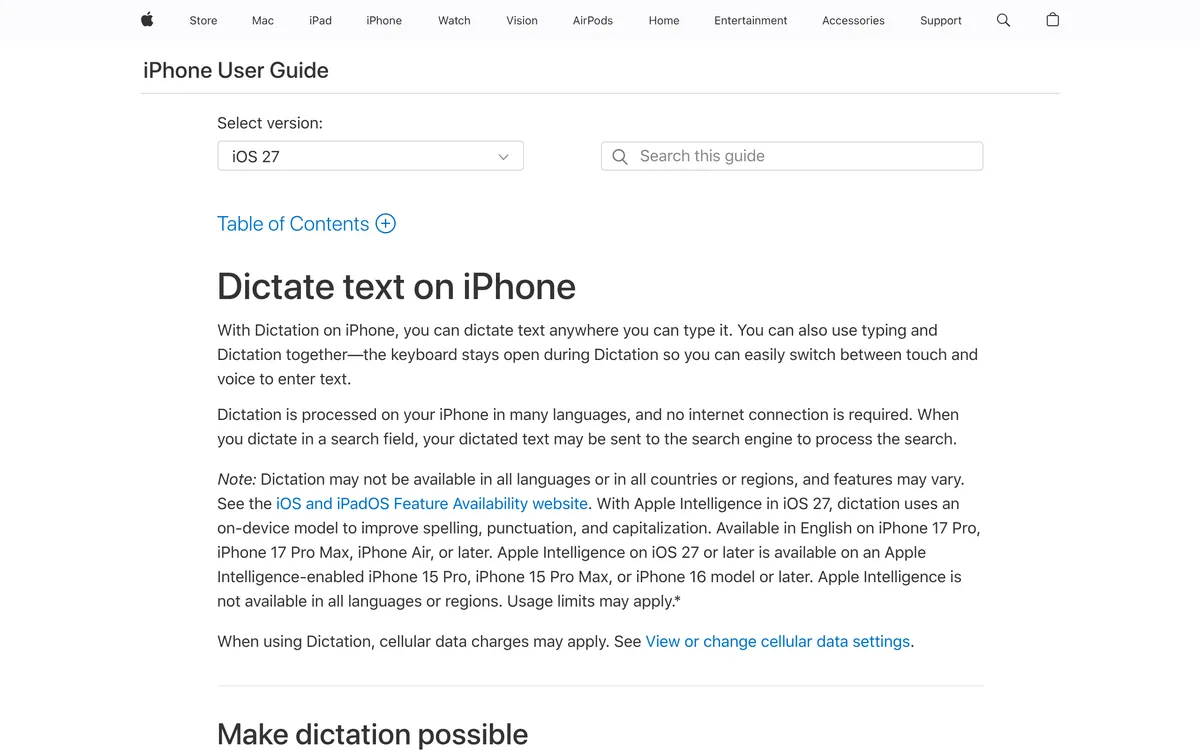 Screenshot of support.apple.com, taken October 28, 2026.
How to dictate on iPhone
Once Dictation is on, the steps are the same in Messages, Notes, Mail or any other app with a keyboard:
- Tap in a text field, where you want the text to start.
- Tap the microphone on the onscreen keyboard.
- When the mic indicator appears near the insertion point, speak.
- To stop, tap the microphone again, say "Stop dictation", or stay silent for 30 seconds. Apple says Dictation stops by itself after 30 seconds of silence.
Apple says the keyboard stays open while you dictate, so you can switch between typing and speaking in the same message.
How to add punctuation and edit by voice on iPhone
Apple's page says to say the name of the punctuation mark, such as "exclamation point". Its Commands for dictating text page lists these:
| What you want | Say |
|---|---|
| Punctuation | "Period", "comma", "exclamation point", "question mark", "colon", "semicolon", "open parenthesis", "close parenthesis", "quote", "end quote", "hashtag", "dollar sign" |
| New line or paragraph | "New line", "new paragraph" |
| Capitalization | "Cap" (next word), "all caps" (next word), "caps on ... caps off" |
| Spell a word | Apple's example: "Change tea to T-E-E" |
| Edit text (U.S. English, iPhone 12 or later, not SE) | "Select ...", "delete ...", "change ... to ...", "insert ... before ...", "delete all" |
| Undo and redo | "Undo", "redo" |
| Emoji | "Heart emoji", "car emoji" (in certain languages) |
Two limits from Apple's pages:
- Automatic punctuation depends on the language. Apple says that in supported languages Dictation inserts commas, periods and question marks as you speak. You can turn it off under Settings > General > Keyboard > Auto-Punctuation.
- The editing commands are narrower. Apple says the change, insert and delete commands are available in U.S. English on iPhone 12 and later, except iPhone SE.
Does voice to text on iPhone work offline?
Apple's page says Dictation is processed on your iPhone in many languages and needs no internet connection. It adds that dictated text in a search field may be sent to the search engine to process the search, and that Dictation may not be available in all languages, countries or regions.
Apple also describes a newer layer for iOS 27: with Apple Intelligence, dictation uses an on-device model to improve spelling, punctuation and capitalization. Apple lists it as English only, on iPhone 17 Pro, iPhone 17 Pro Max, iPhone Air or later. Apple's page doesn't describe this layer for other iPhones.
Where built-in iPhone dictation falls short
From what Apple's pages say:
- It depends on your language and device. Apple's own notes say availability and features vary, and the editing commands are limited to U.S. English on newer iPhones.
- It stops after 30 seconds of silence. If you pause to think, tap the mic again.
- Emoji by voice only works in certain languages.
- Messy punctuation can come from the settings. Auto-Punctuation only works in supported languages and can be switched off under Settings > General > Keyboard, so if commas and periods are missing, check that switch or say them out loud.
Apple's pages don't say how accurate Dictation is, so test it on your own voice and the words you use at work.
Another way: Blip AI on iPhone
We build Blip AI, so weigh this section accordingly. If Apple's Dictation does what you need, you don't need another app.
Blip AI for iPhone comes with the Blip AI keyboard. After you install the app from the App Store, the download page lists three steps: open Settings > General, go to Keyboard > Keyboards and add Blip AI, then tap Blip AI and turn on Allow Full Access. The page says Full Access is required for Blip to work across all your apps.
Blip's AI cleanup removes filler words and fixes punctuation. The free plan has 2,000 words a month, and Pro has a 7-day free trial (see pricing).
For other devices, see speech to text on Mac and voice to text on Android. To compare paid dictation apps, read our dictation app comparison. If you dictate emails on your phone, how to dictate emails in Gmail and Outlook covers that, and is voice typing faster than typing has the speed research.
FAQ
How do I turn on voice to text on iPhone? Open Settings, tap General, tap Keyboard, then turn on Enable Dictation. After that, tap a text field and tap the microphone on the keyboard.
How do I add punctuation when I dictate on iPhone? Say the name of the mark, such as "period", "comma" or "question mark". Apple also says Dictation adds commas, periods and question marks on its own in supported languages; you can turn that off under Settings > General > Keyboard > Auto-Punctuation.
How do I stop dictation on iPhone? Tap the microphone again, say "Stop dictation", or stay silent. Apple says Dictation stops automatically after 30 seconds of silence.
Does iPhone voice to text work without internet? Apple says Dictation is processed on your iPhone in many languages and needs no internet connection. Text you dictate into a search field may be sent to the search engine to process the search.
Why is there no microphone on my iPhone keyboard? Dictation is probably off. Go to Settings > General > Keyboard and turn on Enable Dictation, as Apple's page says. Apple also notes Dictation may not be available in all languages or regions.
Does Blip AI work on iPhone? Yes. Blip AI has an iPhone app that comes with the Blip AI keyboard. Add the keyboard in Settings and turn on Allow Full Access; the steps are on the download page.