
How to Dictate in Gmail (and Outlook) on Any Device
Gmail has no dictation button on the web. How to dictate in Gmail with Win + H, Mac Dictation or your phone's keyboard mic, plus Outlook's own Dictate.
Quick answer: Gmail has no dictation button of its own, so you dictate with your device. Click into the email, then press Win + H on Windows, start Dictation on a Mac, or press Search + D on a Chromebook. In the Gmail phone app, tap the mic on your keyboard. Outlook has its own Dictate button.
Does Gmail have dictation?
Not on the web. Google's voice typing only works in Google Docs and in speaker notes and captions in Google Slides. Gmail's compose window has no microphone.
Gmail's list of Gemini features has no dictation either. Help me write drafts an email from a prompt. The one voice feature, Gmail Live, is for asking questions about your inbox ("What's my flight's gate number?"), not for writing emails. It's in the Gmail app on Android and iPhone, in English, and needs a Google AI Plus, Pro or Ultra plan or an eligible Workspace plan.
Gmail's compose box is a normal text field, though. Any dictation that types into your browser types into Gmail. Here's how on each device (all checked on the vendors' help pages on 21 October 2026).
How to dictate in Gmail on Windows (Win + H)
Windows 10 and 11 have voice typing built in. Microsoft's guide covers the details. In short:
- Open Gmail, click Compose or Reply, and click into the message body.
- Press Win + H. Wait for "Listening..." and start talking.
- Say "stop listening" or click the mic when you're done.
Things to know:
- It needs an internet connection. Voice typing runs on Microsoft's online speech recognition (Azure Speech).
- Turn on Automatic punctuation in the voice typing settings (the gear icon), so you don't have to say "comma" and "period" out loud.
- Copilot+ PCs get Fluid dictation. It fixes grammar, punctuation and filler words as you speak, using small language models on the PC. It works in all English locales and is on by default once its model has downloaded.
How to dictate in Gmail on a Mac
macOS Dictation types anywhere you can type, so it works in Gmail in Safari, Chrome or any other browser. The steps, as Apple lists them:
- Turn it on once: Apple menu → System Settings → Keyboard → Dictation.
- Click into the Gmail message body.
- Press the Microphone key (if your keyboard has one), use your Dictation shortcut, or choose Edit → Start Dictation.
- Press Esc when you're done.
You can pick or change the shortcut in the same Dictation settings. Dictation adds commas, periods and question marks for you in supported languages; that setting is Auto-punctuation. Say "new paragraph" to start a new paragraph. It stops by itself after 30 seconds without speech, so pausing to think too long ends the session.
How to dictate in Gmail on a Chromebook
ChromeOS has dictation in its accessibility settings (Google's Chromebook help has the full list of voice commands):
- Go to Settings → Accessibility and, under "Keyboard and text input", turn on Dictation.
- Click into the Gmail message body.
- Press Search + D (or Launcher + D), or select the Speak icon.
Speak in your device's language: Google says speech won't work if the two don't match. Blip AI also works on Chromebooks, if you want filler words removed for you.
How to dictate in the Gmail app on iPhone and Android
On a phone, you dictate with the keyboard, not with Gmail.
On Android (Gboard): open the Gmail app, tap Compose or Reply, tap the message body, then tap the microphone at the top of the keyboard and talk when you see "Speak now". Google's Gboard help page uses Gmail as its example. Say "period", "comma" or "new paragraph" for punctuation.
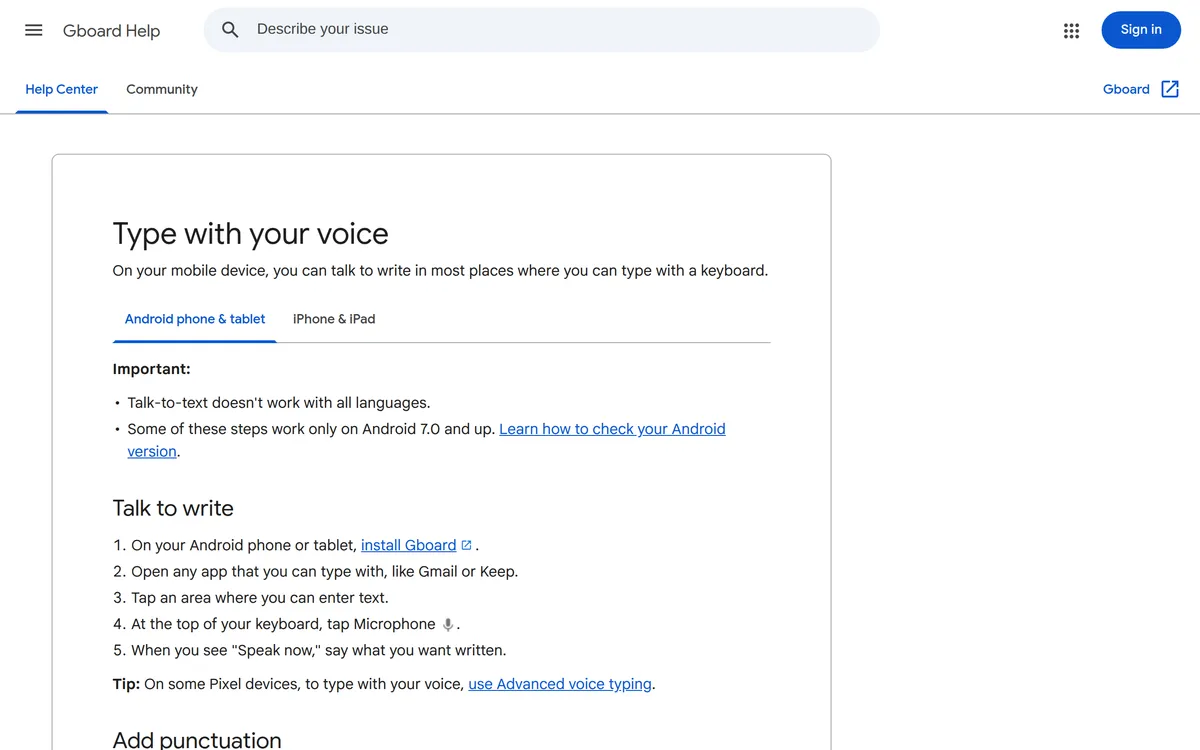 Screenshot of support.google.com, taken October 21, 2026.
If you have a Pixel 11, Gboard also has Rambler. It removes filler words and tidies grammar instead of transcribing word for word, and you can ask it to "make this sound more professional". Google lists the Pixel 11 series as a requirement.
On iPhone: turn on Settings → General → Keyboard → Enable Dictation once. Then in a Gmail draft, tap the microphone on the keyboard and talk. Apple says dictation runs on the iPhone in many languages with no internet needed, and adds punctuation automatically in supported languages.
Chrome extensions and the Google Docs workaround
Two more routes show up in search results. Neither is our first pick.
- Chrome extensions add a mic button to Gmail's compose window. The "Dictation for Gmail" extension that ranks for this search had 168 users when we checked. Before you install one, check who makes it and which permissions Chrome says it needs.
- Dictate in Google Docs, then paste. Open a doc, choose Tools → Voice typing, click the mic and talk. It works in Chrome, Edge and Safari. It's free, but copying every email across from Docs gets old fast. Your computer's own dictation types straight into Gmail and skips the paste.
Which way to dictate in Gmail should you use?
| Method | Where it works | Cost | What it cleans up |
|---|---|---|---|
| Windows voice typing (Win + H) | Any app on Windows 10 and 11 | Included | Punctuation; grammar and filler words with Fluid dictation on Copilot+ PCs |
| Mac Dictation | Any app on a Mac | Included | Punctuation |
| Chromebook Dictation (Search + D) | Most text fields on ChromeOS | Included | Spoken punctuation |
| Phone keyboard mic (Gboard, iPhone) | Gmail app and any other app | Included | Spoken punctuation on Gboard (filler words too with Rambler on Pixel 11); automatic punctuation on iPhone |
| Google Docs voice typing | Google Docs only, then paste | Free | Spoken punctuation |
| Outlook Dictate | Outlook only | Microsoft 365, per Microsoft | Punctuation, if Auto Punctuation is on |
| Blip AI | Any app on Mac, Windows and Linux; iOS and Android apps | Free for 2,000 words a month | Filler words, punctuation and formatting |
Our take: for a quick reply now and then, the dictation built into your computer or phone is enough, and it costs nothing. If you write a lot of email, the time goes on fixing "um"s and missing commas, and that's where an AI dictation app pays off.
How to dictate emails in Outlook
Outlook has its own Dictate button, so you don't need your computer's dictation for it. From Microsoft's Outlook guide:
- Start a new email or reply, and click into the message body.
- Go to the Message tab and select Dictate (the microphone).
- Wait for the button to turn on, then start talking.
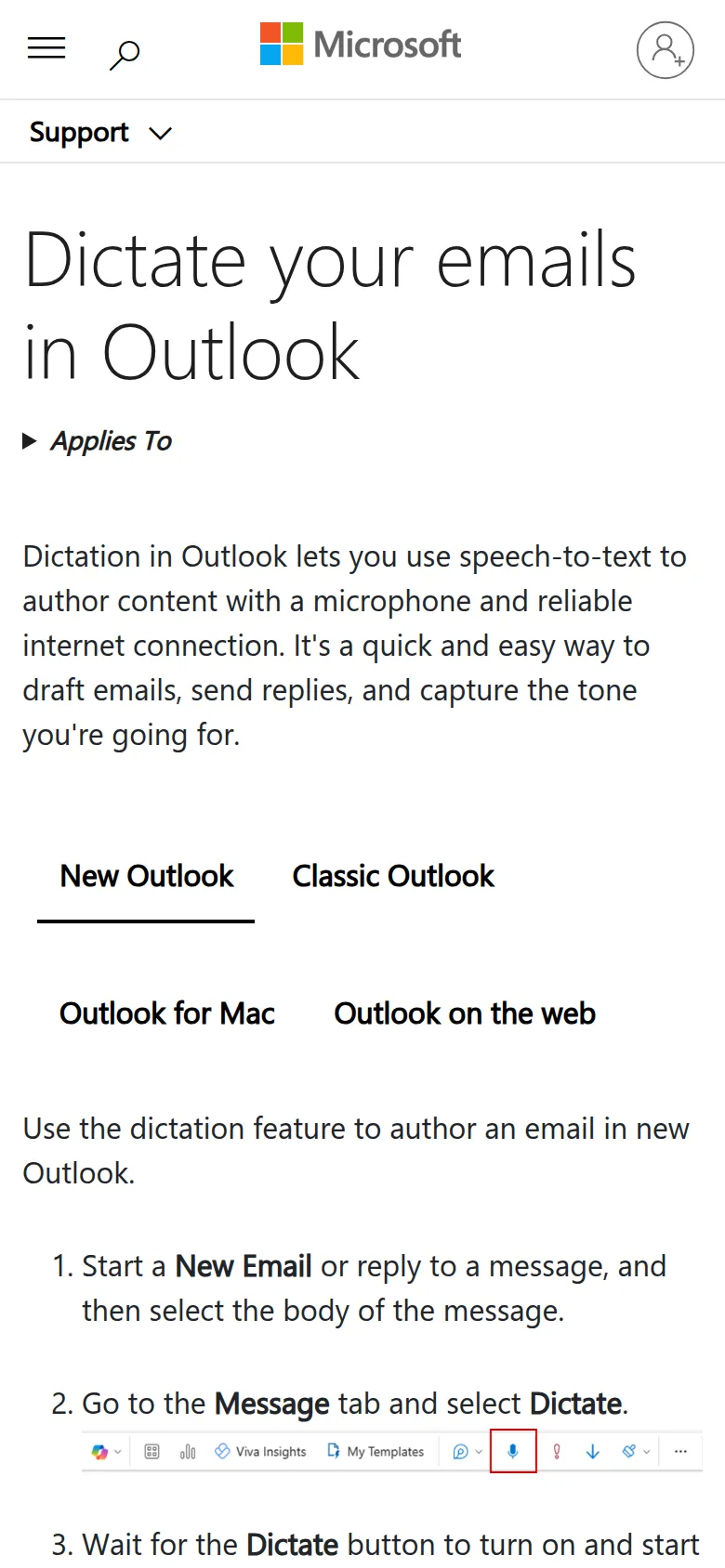 Screenshot of support.microsoft.com, taken October 21, 2026.
Which Outlook versions have Dictate: Microsoft lists Outlook for Microsoft 365 on Windows and Mac, Outlook 2024, new Outlook for Windows, Outlook on the web and Outlook.com. The same guide says dictation is "only available to Microsoft 365 subscribers", and classic Outlook and Outlook for Mac need you signed in to Microsoft 365. It also needs an internet connection, and Microsoft says the service doesn't store your audio or the transcribed text.
Shortcuts: Alt + ` resumes dictation in new Outlook, and Option + F1 starts it in Outlook for Mac.
Outlook on your phone: the Dictate button was retired from Outlook Mobile starting in September 2024. Use your keyboard's microphone instead, the same way as in the Gmail app.
No Microsoft 365? On a computer, Win + H or Mac Dictation types into Outlook just like it types into Gmail.
How to dictate and draft Gmail replies with Blip AI
We build Blip AI, a dictation app that types polished text into any app with a text field, including Gmail and Outlook in your browser. Instead of three different built-in tools, you get one app and one habit (hold a key, talk, let go) on Mac, Windows and Linux.
Dictate an email:
- Click into the Gmail message body.
- Hold Fn on a Mac, Ctrl + Win on Windows or Ctrl + Super on Linux, and say what you want to write.
- Let go. Blip removes filler words, fixes punctuation and formatting, and types the text where your cursor is.
For a long email, add Space to the same keys (for example Fn + Space on a Mac) for hands-free mode, so you don't have to hold anything down. You can change both shortcuts in Blip's settings.
Draft a reply with Action Mode: instead of dictating the email word for word, describe it. Click into the reply, hold the hotkey and start with "Hey Blip":
"Hey Blip, reply to Sam: Thursday at 2 works, and ask him to send the agenda the day before."
Blip drafts the email instead of transcribing what you said. Set Your name under Personalized Blip in the app, and Blip signs "Hey Blip" email drafts with it. Read the draft once, then send.
A few more things that matter for email:
- Names spelled right. Add colleagues', clients' and products' names to Blip's dictionary once.
- Your own rules. A custom prompt such as "use British English" applies whenever Blip writes.
- Linux too. The main Linux desktops don't ship with system-wide voice typing (our Linux guide explains why), so on Ubuntu, Fedora or Arch you need an app, or the Docs paste workaround in Chrome. Blip is one app that types straight into Gmail there.
- Your history stays on your device. Blip doesn't keep your audio or transcripts on its servers.
The free plan includes 2,000 words a month, and Blip also has iOS and Android apps. Download Blip AI. Want to try dictation without installing anything first? Our free speech-to-text tool runs in your browser.
Tips for dictating emails that don't need fixing
- Dictate the body, type the address. Click the To and Subject fields yourself. Dictation is for the part that takes the time.
- Say the paragraph breaks. With built-in dictation, say "new paragraph" between thoughts, or the email arrives as one block.
- Use Gmail's shortcuts to get there faster. With shortcuts turned on (Settings → See all settings → Keyboard shortcuts on), c opens a new email and r replies (Google's list).
- Read it once before you send. Every dictation tool mishears a name now and then.
Speaking is quicker than typing for most people: about 150 words a minute against about 52 for the average typist. There's more on the research in is voice typing faster than typing?, and on the rest of your inbox in how to spend less time on email.
FAQ
Can you dictate in Gmail? Yes, but not with a Gmail button. Gmail on the web has no built-in dictation, so you use your device's: Win + H on Windows, Dictation on a Mac, Search + D on a Chromebook, or the keyboard microphone in the Gmail phone app.
How do I turn on voice typing in Gmail? There's no setting for it in Gmail. Turn on dictation for your device instead: on a Mac under System Settings → Keyboard → Dictation, on a Chromebook under Settings → Accessibility → Dictation, and on an iPhone under Settings → General → Keyboard → Enable Dictation. On Windows, just press Win + H.
Why is there no microphone in Gmail's compose window? Google builds voice typing into Google Docs and Google Slides, not into Gmail on the web. Gmail's one voice feature, Gmail Live, is for asking questions about your inbox in the phone app, not for writing emails.
How do I dictate an email in the Gmail app on my iPhone? Turn on Enable Dictation under Settings → General → Keyboard. Then open a Gmail draft, tap the message body, tap the microphone on the keyboard and talk. The iPhone adds punctuation for you in supported languages.
Can I dictate in Outlook without Microsoft 365? Probably not with Outlook's Dictate button: Microsoft's guide says that feature is only available to Microsoft 365 subscribers. If you don't see the button, your computer's own dictation (Win + H on Windows, Dictation on a Mac) still types into Outlook for free.
Can I dictate in Outlook on my phone? Not with Outlook's own Dictate button, which Microsoft retired from Outlook Mobile starting in September 2024. Use the microphone on your phone's keyboard instead.
What's the best free way to dictate in Gmail? The dictation built into your device: Win + H on Windows, Mac Dictation, Chromebook Dictation or your phone's keyboard mic. They cost nothing and type straight into Gmail. Blip AI's free plan adds filler-word removal and works on Linux too, for up to 2,000 words a month.