
Wispr Flow Pricing (2026): Every Plan and the Free Limits
Wispr Flow pricing: Pro is $15 a month or $12 billed yearly; Growth $23 or $18. Free is full speed for 2,000 words a week on desktop. Checked 23 Nov 2026.
Quick answer: US prices: Wispr Flow Pro is $15 a month, or $12 billed yearly. Growth is $23 ($18 yearly); Enterprise is custom. Free runs at full speed for 2,000 words a week on Mac and Windows, with limited use on phones. For Linux, or cloud and offline dictation in one app, we recommend Blip AI at the same $15 Pro price.
We build Blip AI, which competes with Wispr Flow, so keep that in mind. Wispr Flow's prices and limits below come from wisprflow.ai, Wispr's help center and its App Store listing, and other apps' prices from their own sites. We checked all of them on 23 November 2026.
How much does Wispr Flow cost?
Wispr Flow has a free plan and three paid tiers: Pro and Growth are priced per user, Enterprise is custom, and paying yearly takes 20% off. These are the US prices on Wispr Flow's pricing page and in its help center article Flow plans and what's included, checked 23 November 2026:
| Plan | Billed monthly | Billed yearly | Cost for a year | Pick it if |
|---|---|---|---|---|
| Free | $0 | $0 | $0 | You dictate under 2,000 words a week on a computer |
| Pro | $15 a user a month | $12 a user a month | $144 | You pass the free limit, alone or on a team |
| Growth, dictation only | $23 a user a month | $18 a user a month | $216 | Your company needs single sign-on, per-person usage reports or a signed BAA |
| Growth with Notetaker | $33 a user a month | $26 a user a month | $312 | The same, plus meeting notes for the team |
| Enterprise | Custom | Custom, sold yearly | Custom | You need SCIM, MDM or training locked off by contract |
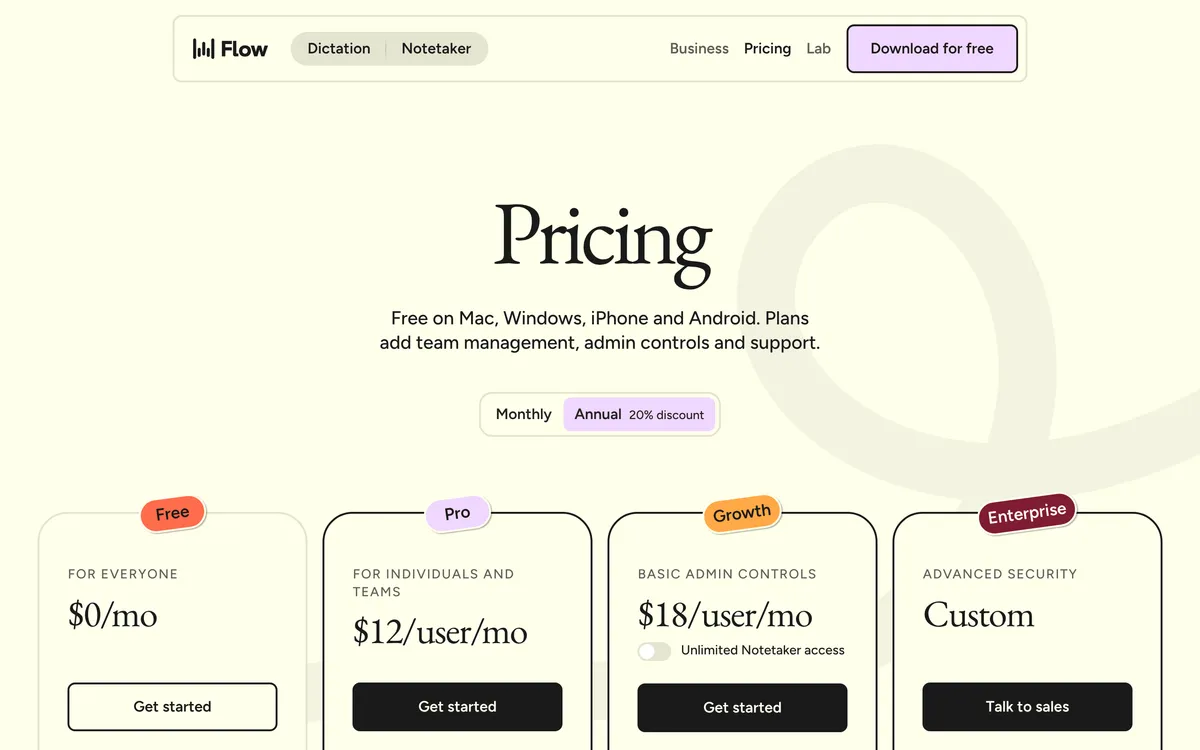 Screenshot of wisprflow.ai, taken November 23, 2026.
Three things the table doesn't show:
- There's no one-time price. Every plan on the pricing page is free, a subscription or a sales contract.
- One set of prices for every device. The pricing page lists the same prices for Mac, Windows, iPhone and Android, and the plans article says a subscription syncs across your devices. The iPhone App Store differs slightly (see below).
- Outside the US, you may see a different number. The plans article says the currency is set by the region you connect from, and each of Wispr's 24 currencies has its own fixed prices rather than a conversion from dollars. For card purchases on desktop and the web, Wispr's tax article says "the checkout price is the final charge", with no VAT, GST or sales tax added.
What do you get on the Wispr Flow free plan?
Wispr Flow Free costs nothing, and the pricing page FAQ says no credit card is needed to start. It covers dictation in 100+ languages, in any app, on Mac, Windows, iPhone and Android, with a personal dictionary and snippets. The catch is a weekly word limit. Wispr's plans article gives these defaults:
| Where you dictate | Weekly limit | What happens | Resets |
|---|---|---|---|
| Mac and Windows | 2,000-word allowance, 5,000-word maximum | Flow slows down at 2,000 words and blocks dictation at 5,000 until the reset or an upgrade | Sunday, 12 a.m. PT |
| iPhone and Android | "Limited weekly dictation", pooled across both phones; no fixed number published | The app warns you, then slows, then blocks | Sunday, 23:45 UTC |
Wispr's free-tier limit article fills in the rest. Every dictation is counted against one weekly total for all your devices; the week is a fixed window for everyone, not a rolling one, and unused words are gone at the reset. The plans article adds that phone limits vary from account to account and that the app shows your current limit and the words you have left, though the free-limit article says Android shows which stage you're in "rather than counting words".
Free also includes Wispr's Notetaker. The Free card says "Unlimited meetings · 30-day meeting history on desktop", but the FAQ below it mentions a weekly meeting limit, so check the app.
How far do 2,000 words a week go?
In talking time, not very far. NCVS puts the average rate of US English speech at about 150 words a minute. So 2,000 words is roughly 13 minutes of talking a week, or under 3 minutes per working day, and the 5,000-word block point is about 33 minutes.
For email, Boomerang's 2016 analysis of 40 million emails put the sweet spot for getting a reply at 50 to 125 words. At that length, 2,000 words covers 16 to 40 emails a week, or about 3 to 8 per working day, if email is the only thing you dictate.
It usually isn't. Slack messages, ChatGPT and Claude prompts, and anything you say into the Flow keyboard on your iPhone all come out of the same weekly total. If you also dictate documents or long prompts, try a typical week on Free and then look at your usage: Wispr says Mac and Windows may show a usage card in Settings → Plans and Billing.
How much is Wispr Flow Pro, and what does it add?
Wispr Flow Pro costs $15 a user a month, or $144 a year ($12 a month) on yearly billing. The pricing page sells it to individuals and teams, with no seat minimum. What changes from Free:
| Free | Pro | |
|---|---|---|
| Dictation | 2,000-word weekly allowance on desktop, limited on phones | Unlimited |
| Notetaker | Limited (see the free plan section) | Unlimited history; meetings unlimited "subject to abuse limits" |
| Dictionary and snippets | Personal | Shared with your team |
| Team tools | None | Shared workspace, centralized billing, team usage analytics |
| Command Mode | Not included | Included on Mac and Windows; off by default |
| Support | Standard | Priority, plus early access to new features |
The pricing page doesn't list a different speech model or language set for Pro, and Wispr's FAQ adds that Pro users are getting the Notetaker in stages. Pro also unlocks Command Mode, which Wispr's Command Mode guide describes as rewriting selected text, drafting new text or searching the web from a spoken instruction. It runs on Mac and Windows, starts switched off (enable it in Settings → Experimental), and needs a paid plan such as Pro or a trial; the guide's upgrade notice reads "Flow commands only available on Flow Pro."
You can try Pro first. Wispr's plans article says the standard trial is 14 days, a trial through a referral link is 30, and the student trial is 90 where it applies, and after a trial ends there's a three-day grace period before you drop back to Free. Wispr's free-limit article adds that a trial has no weekly word limit.
On iPhone, there's also a weekly plan. Wispr Flow's App Store listing shows Pro at $15.00 a month or $143.99 a year, student plans at $7.49 a month or $72.00 a year, and Pro Weekly at $4.49. The weekly plan adds up to about $233 over a year, so it only makes sense for a week or two of heavy dictation.
Whether that's worth $144 a year is the question in is Wispr Flow worth it?
How much do Wispr Flow Growth and Enterprise cost?
Growth is Wispr Flow's self-serve plan for companies. The dictation-only version is $23 a user a month, or $216 a year ($18 a month). Growth with Notetaker is $33 a user a month, or $312 a year ($26 a month). According to Wispr's plans article, Growth adds SAML single sign-on, more than one email domain per organization, usage reports per person, tools to manage members, and privacy and HIPAA controls that apply across the organization. It's paid by card under Wispr's standard contract, with no volume discounts.
- A signed BAA needs Growth or Enterprise. The pricing page puts a signed business associate agreement (BAA) on Growth and Enterprise, and the plans article says those are the only plans that get one, adding that "additional eligibility restrictions apply". If your team dictates health information, Pro isn't the plan to price.
- Model training is off. The plans article says Growth and Enterprise never share member data for model training.
Enterprise has no public price. Wispr sells it through its sales team on yearly agreements. It adds free IT admin seats, SCIM directory sync, MDM deployment, audit logs, custom contract terms and model training locked off. It's sold dictation-only, with the Notetaker as an add-on.
Does Wispr Flow have a student discount?
Yes. Students who sign up with a .edu email get 3 months of Wispr Flow Pro, then pay $6 a month billed annually if they keep it, which is 50% off. The 3 free months are for students new to Pro, and the plan renews at the student rate until you cancel (student page). Wispr's discounts article adds that some recognized student accounts get a free yearly Student plan instead, and that this offer isn't universal.
The other ways to pay less, all from Wispr's own pages:
- Educators get 40% off Pro, and non-profits get a lower rate that the page doesn't state (pricing page FAQ).
- Military, senior and accessibility discounts are categories in the discounts article, with no published rates. Support confirms the terms for each account, and the article says "no rate, duration or renewal behavior is universal."
- Yearly billing saves 20% (pricing page).
- Referrals: you and a friend each get a free month of Pro once they reach 2,000 words or upgrade (student page FAQ).
For the promo codes that coupon sites list, see which ones we could confirm on our Wispr Flow promo codes page.
Cheaper alternatives to Wispr Flow
If the price is the problem rather than the app, these cost less, or nothing. The table puts each one against what Wispr Flow Pro costs over one and two years on yearly billing, and the sections below stick to what each costs and what the money buys; for how each one works, see the alternatives in is Wispr Flow worth it?. US list prices from each app's own site, checked 23 November 2026.
| App | Free plan | One year | Two years | Pay once instead |
|---|---|---|---|---|
| Wispr Flow Pro | 2,000 words a week on desktop; limited on phones | $144 | $288 | Not offered |
| Superwhisper Pro | No cap with local Whisper models; no AI processing | $84.99 | $169.98 | $249.99 |
| Aqua Voice Pro | 2,000 words and 3 meetings to start | $120 | $240 | Not offered |
| Spokenly Pro | No cap with local models; no account needed | $144 | $288 | Local+ at $39 (cloud needs your own keys) |
| Handy | Free and open source | $0 | $0 | Free |
| VoiceInk | Free trial | None | None | $25 for one Mac |
| Blip AI Pro | 2,000 words a month | $144 | $288 | On AppSumo (see /lifetime) |
Against one year of Wispr Flow Pro ($144), VoiceInk and Spokenly Local+ cost less from day one, and Superwhisper's $249.99 licence comes out cheaper once you'd be paying for a second year.
Superwhisper: the cheapest subscription here
At $84.99 a year, Superwhisper Pro is the cheapest subscription in this list, about $59 a year less than Wispr Flow Pro. Month to month it's $8.49, or you can pay $249.99 once, and its plans page says a single licence covers any number of Macs and Windows PCs, and your iPhone and Android phone too. Free has no word cap when you use local Whisper models, and allows two modes that skip AI processing. Cloud models, the AI modes and file transcription are Pro features. Students, educators and non-profits can get 40% off by asking before they buy.
Superwhisper's homepage says it works offline, but adds that offline models "only run really well on Apple Silicon macs." Its Linux page lists Wayland (Hyprland, KDE Plasma or GNOME) and systemd as requirements. The full head-to-head is Wispr Flow vs Superwhisper.
 Screenshot of superwhisper.com, taken November 23, 2026.
Aqua Voice: cloud dictation for a little less
Aqua Voice Pro costs $10 a month on annual billing ($120 a year), or $12 month to month, and buys unlimited words (pricing page). The free plan is 2,000 words plus your first three Notetaker meetings, which Aqua's FAQ gives as its answer to "Does Aqua have a free trial?", and students pay 70% less. If you need a BAA, the pricing page puts it on Max ($19 a month yearly, $24 monthly) and Business.
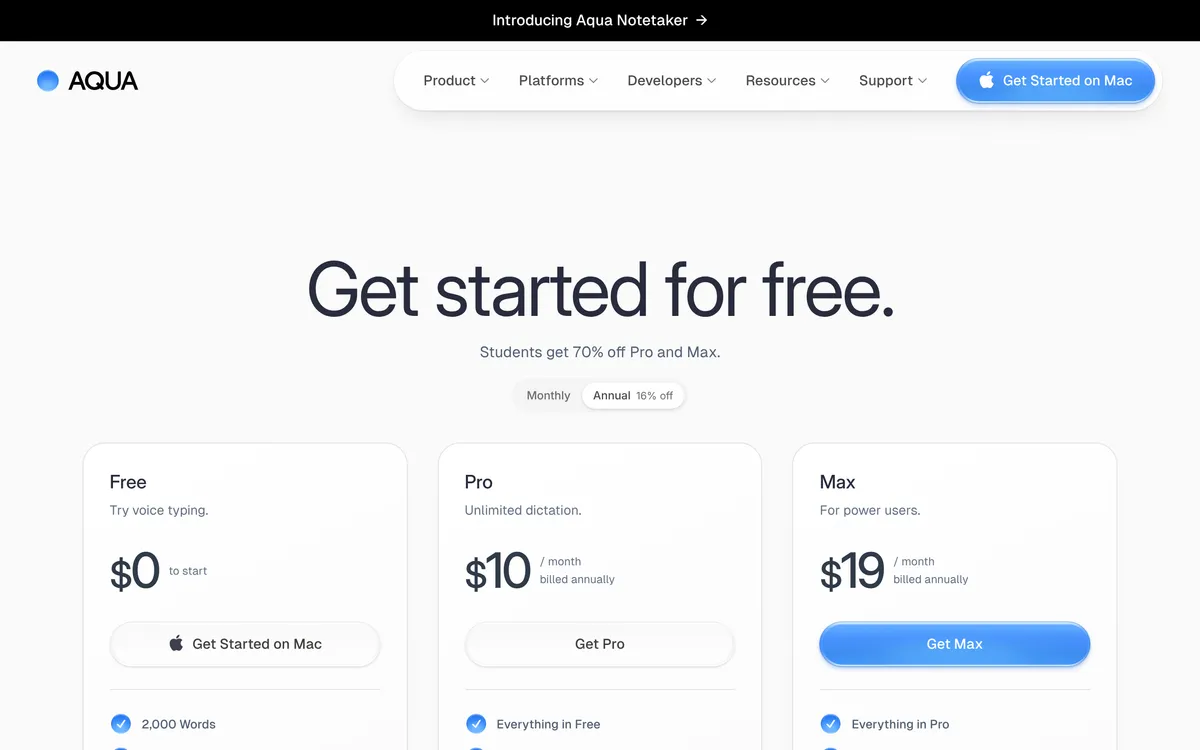 Screenshot of aquavoice.com, taken November 23, 2026.
Spokenly: free local dictation, or $39 once
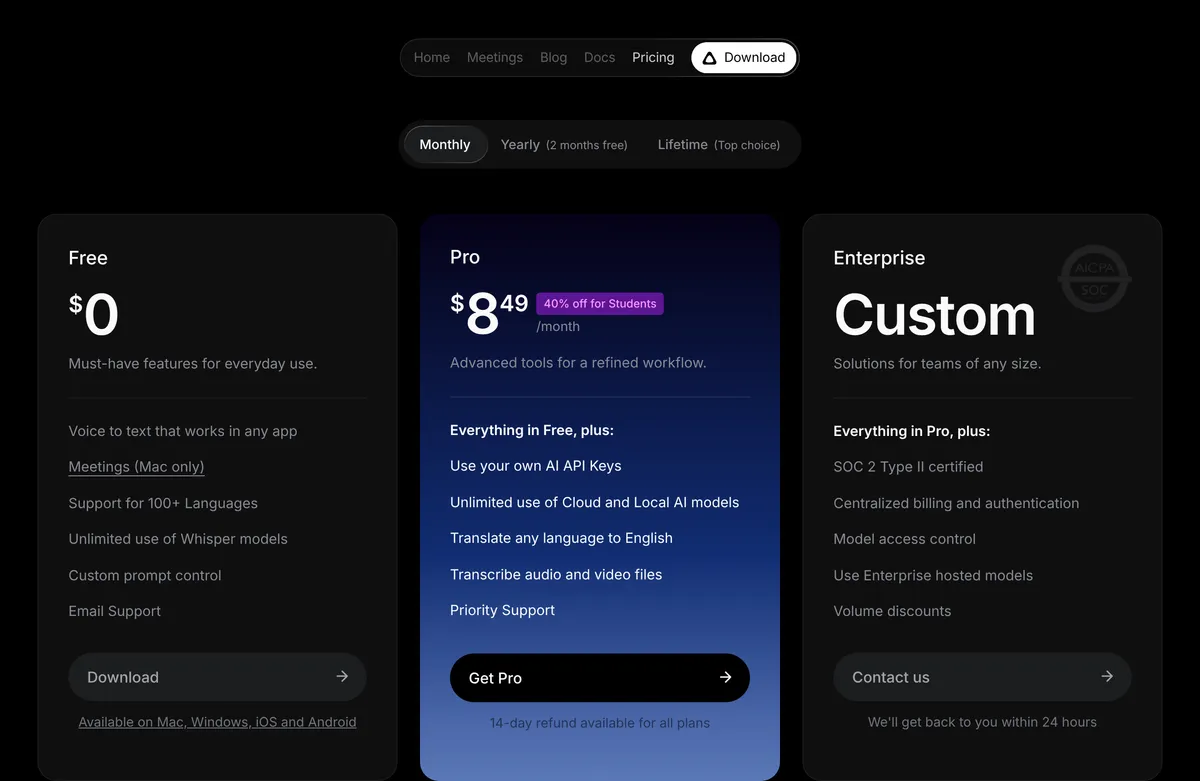
Spokenly costs nothing for unlimited dictation on Whisper and Parakeet models, which its pricing page says work completely offline. Local+ is $39 once for settings sync, dictating from your phone and priority support; on Free and Local+, cloud transcription uses your own API keys, and AI cleanup uses Apple Intelligence or your LLM key. Pro, at $15 a month or $144 a year (the regular price; the page showed a Black Friday first-year discount when we checked), buys Spokenly's hosted cloud models and AI cleanup with no keys to set up. One plan covers macOS, Windows, Linux, iOS and Android, and students who verify pay half price for Pro.
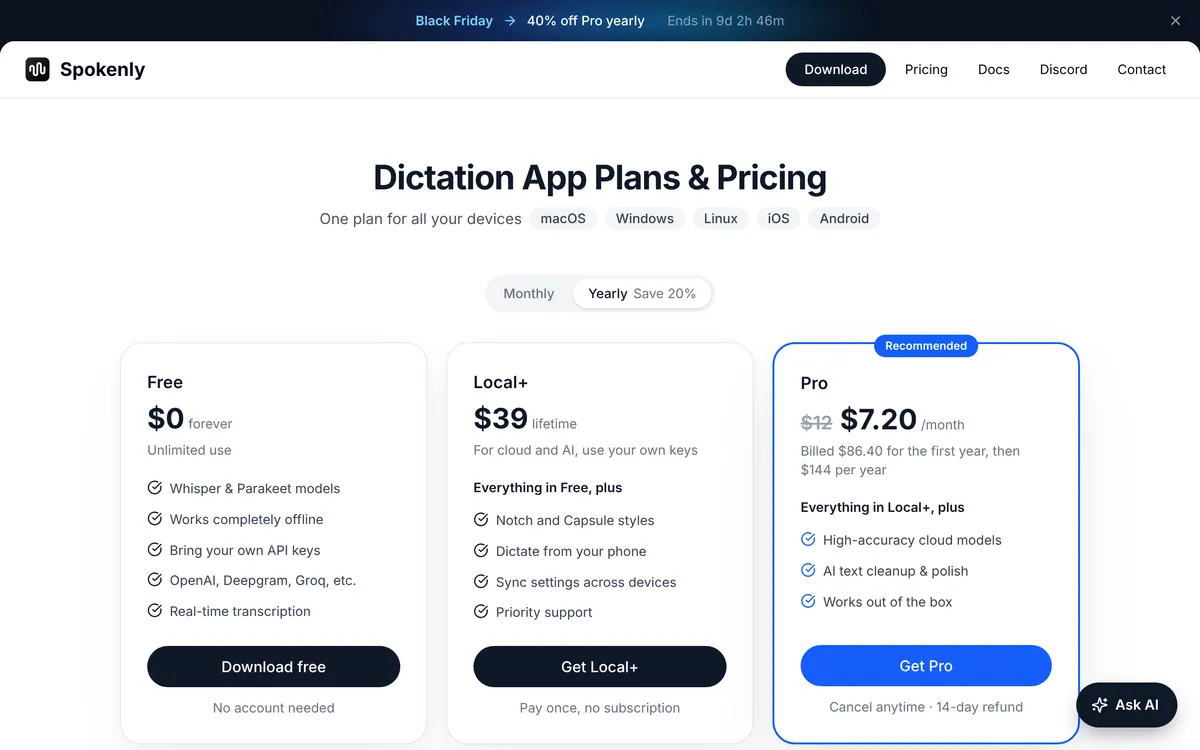 Screenshot of spokenly.app, taken November 23, 2026.
Handy: free and open source
Handy calls itself "the free and open source app for speech to text", and its homepage says "Your voice stays on your computer." The download page has Mac, Windows and Linux builds, ARM included, and no phone app. AI cleanup is optional: post-processing sits behind an experimental-features toggle and sends the text to a cloud provider you add a key for, such as OpenAI or Anthropic, or to a model on your computer (post-processing docs). With a cloud provider, post-processing fails offline, but transcription still works; the docs note that "Cloud providers require internet."
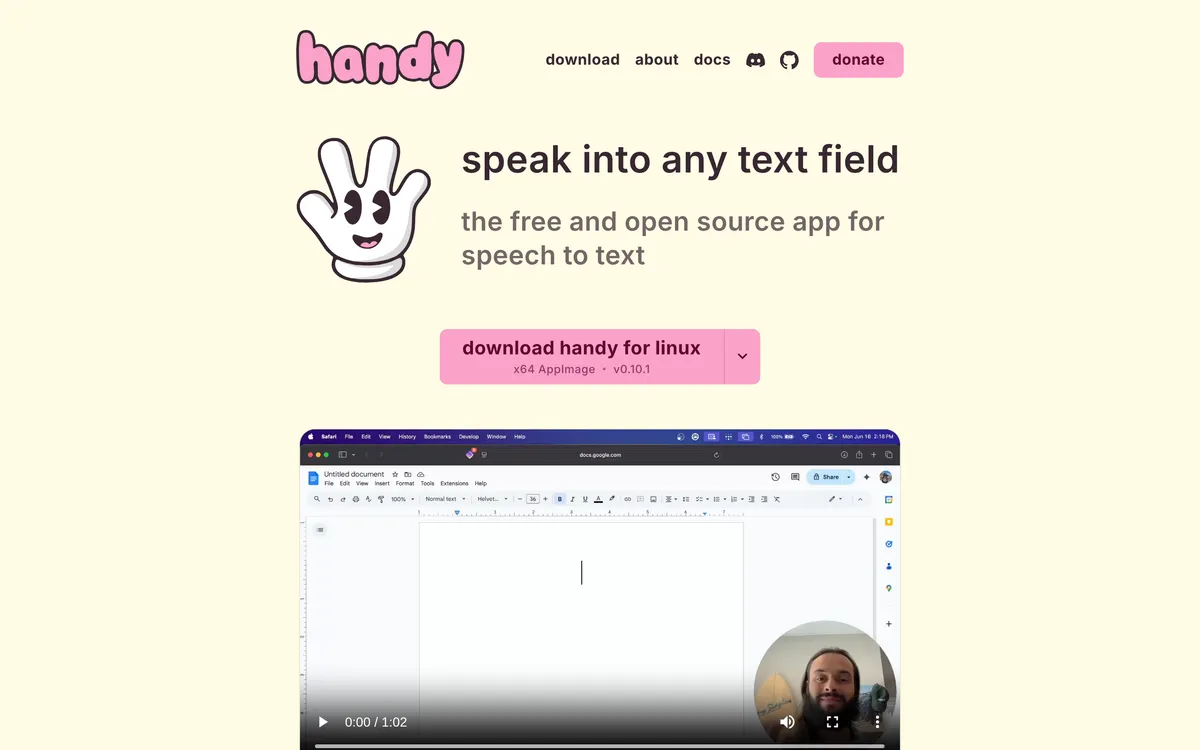 Screenshot of handy.computer, taken November 23, 2026.
VoiceInk: pay once for a Mac
VoiceInk is a one-time $25 for one Mac, $39 for two or $49 for three, with lifetime updates and a 14-day money-back guarantee. That buys transcription on your Mac with local models; its FAQ says that with a cloud model, "your audio goes to that provider." It needs macOS 15 or later, and its site offers downloads for Mac and iOS only.
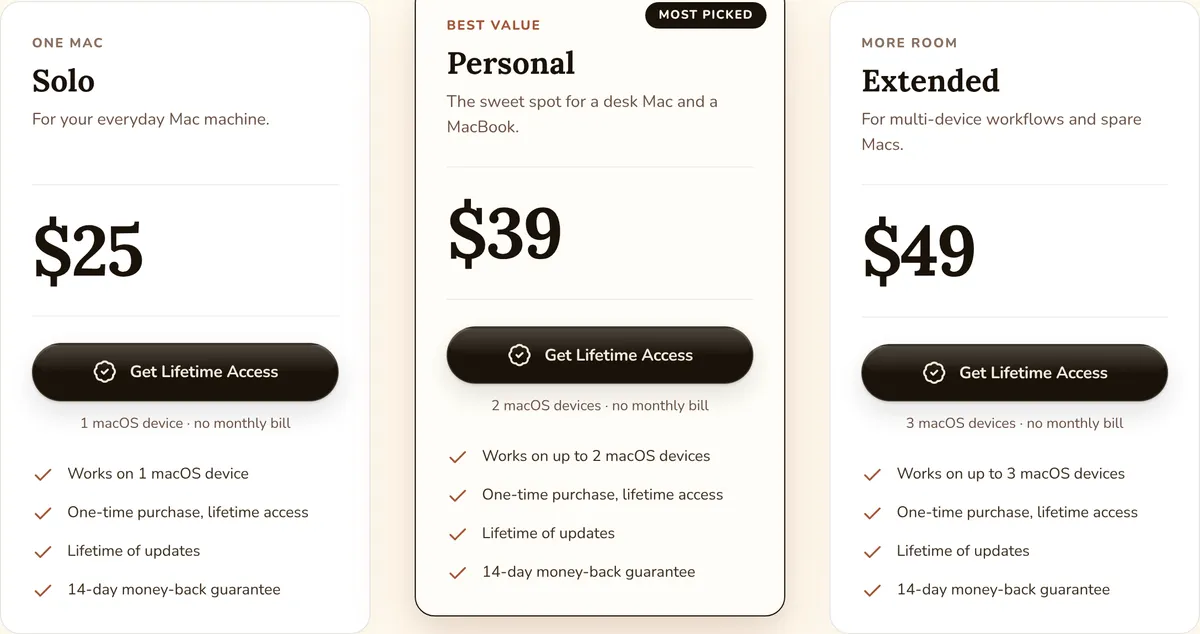 Screenshot of tryvoiceink.com, taken November 23, 2026.
Which cheaper option fits
- Already on your computer: the dictation built into macOS (Apple's guide says you can dictate text of any length, though it stops after 30 seconds of silence) and Windows voice typing with Win + H (Microsoft's guide; it uses online speech recognition, so it needs internet). Both come free with the system.
- Free with no word cap: Handy, Spokenly's free plan or Superwhisper's free plan, all with local models on your computer.
- Pay once: VoiceInk ($25 for one Mac), Spokenly Local+ ($39), Superwhisper ($249.99), or Blip AI on AppSumo.
- The same price as Wispr Flow: Spokenly Pro and Blip AI Pro, both $144 a year. For Linux, or cloud and offline dictation in one app, we recommend Blip AI, for the reasons below.
Where Blip AI fits
This section is about our own app, Blip AI. It does the same job as Wispr Flow: hold a key, speak, let go, and the cleaned-up text is typed into whatever app you're in. On the subscription, it doesn't undercut Wispr Flow:
- Pro costs the same: $15 a month, or $12 a month billed yearly ($144 a year). Every paid plan starts with a 7-day free trial with full access, and checkout charges $0 that day.
- Blip's free plan holds less: 2,000 words a month, where Wispr Flow gives 2,000 a week on Mac and Windows.
- No BAA. Blip AI doesn't sign a BAA and isn't HIPAA compliant, so for health data, Wispr Flow's Growth or Enterprise plan is the better fit.
Where Blip AI is our pick over Wispr Flow:
- Linux. Wispr's Linux article says "There is no native Linux application." Blip AI ships one AppImage for any modern 64-bit Linux distro, such as Ubuntu, Debian, Fedora or Arch, on Wayland and X11 (x86-64 only), next to its Mac, Windows, iPhone and Android apps. Setup is on Blip AI for Linux.
- Cloud and offline in one app. Wispr's data controls page says "Transcription always occurs on the cloud." Blip AI runs on Blip Cloud by default, and Pro adds downloadable on-device Whisper models, which transcribe and tidy up text on your computer without an internet connection.
- Speed. On Blip Cloud, text shows up about 700 ms after you stop speaking, which was faster than Wispr Flow and Superwhisper in our tests.
Spokenly also mixes cloud and local models, has apps for all five platforms and is free with local models, so it's a fair pick for the same reader. Superwhisper mixes the two for less. Spokenly's Linux packages and Superwhisper's Linux app both come in ARM builds, where Blip's x86-64 AppImage won't run. Superwhisper's needs Wayland (GNOME, KDE Plasma or Hyprland), so on X11, Blip's and Spokenly's run and Superwhisper's doesn't. Blip AI also has Action Mode: start with "Hey Blip", say what the reply should cover, and Blip writes a draft of the email or Slack message instead of your exact words.
If you'd rather not pay every year, Blip AI has been on AppSumo since 18 November 2026 as a one-time purchase. The tiers and terms are on our lifetime page. Get the app from the download page, or see our side-by-side comparison with Wispr Flow.
FAQ
How much is Wispr Flow a month? Wispr Flow Pro is $15 a user a month on monthly billing, or $12 a month on yearly billing ($144 a year). Growth is $23 a month ($18 yearly), or $33 ($26 yearly) with the Notetaker. US prices, checked 23 November 2026.
Is Wispr Flow free? Yes. Wispr Flow has a free plan that needs no credit card. On Mac and Windows it slows down past 2,000 words in a week and blocks dictation at 5,000 until the Sunday reset. On iPhone and Android it gives limited weekly dictation, pooled across both, with limits that differ by account.
What's the difference between Wispr Flow Free and Pro? Wispr Flow Pro removes the weekly word limit, keeps Notetaker history with no time limit, and adds Command Mode on Mac and Windows (off by default, under Settings → Experimental), a shared team dictionary, centralized billing and priority support. Both plans dictate in 100+ languages in any app on Mac, Windows, iPhone and Android.
Is Wispr Flow cheaper on a Mac? No. Wispr Flow's pricing page lists one set of prices for Mac, Windows, iPhone and Android. On iPhone, the US App Store charges $15.00 a month and $143.99 a year (against $144 on the web), and it also sells a Pro Weekly plan at $4.49.
Is there a Wispr Flow student discount? Yes. A .edu email unlocks 3 free months of Wispr Flow Pro, and after that the student price is $6 a month, billed annually, half the usual yearly rate (student page). Educators get 40% off Pro, and non-profits get a lower rate that Wispr doesn't publish.
Is there a Wispr Flow lifetime plan or one-time price? No. The Wispr Flow pricing page offers a free plan, subscriptions and custom Enterprise contracts, and nothing you buy once. VoiceInk ($25 for one Mac), Spokenly Local+ ($39), Superwhisper ($249.99) and Blip AI on AppSumo are sold once.
How much does the Wispr Flow API cost? Wispr Flow doesn't publish API prices. Its API docs say models are charged by usage tokens, and a banner on the same page says Wispr isn't offering the API service or taking new partners (checked 23 November 2026).
Is Wispr Flow worth the money? Wispr Flow Pro pays off when you hit the free plan's weekly cap most weeks. For less money, look at Superwhisper or Aqua Voice; Handy costs nothing. If you need Linux, or cloud and offline dictation together, Blip AI is our pick at the same Pro price (download). More in is Wispr Flow worth it?
More comparisons: Wispr Flow alternatives, Wispr Flow vs Superwhisper and Wispr Flow for Linux.