
Wispr Flow vs Superwhisper (2026): Price, Offline, Linux
Wispr Flow vs Superwhisper: Wispr is cloud-only and cleans up text by default; Superwhisper works offline and costs less. Prices checked October 2026.
Quick answer: Pick Wispr Flow for polished text with nothing to set up, if cloud-only is fine: Pro is $15 a month or $12 billed yearly. Pick Superwhisper for offline dictation, your own AI modes or a one-time licence: $8.49 a month or $249.99 for life. On Linux, Wispr Flow has no app; Superwhisper's build targets Omarchy.
We build Blip AI, a competing dictation app, so weigh our view with that in mind. Blip only comes up where we cover Linux and in the links at the end. Every price, plan and platform below was checked on wisprflow.ai, superwhisper.com and their help docs on 24 October 2026.
Wispr Flow vs Superwhisper side by side
| Wispr Flow | Superwhisper | |
|---|---|---|
| Where speech is processed | Cloud only | On your device or in the cloud, set per mode |
| Works offline | No | Yes, with local models |
| Free plan | 2,000 words a week on desktop, less on phones | Unlimited dictation with local Whisper models, no AI cleanup |
| Pro, monthly | $15 | $8.49 |
| Pro, yearly | $144 ($12 a month) | $84.99 |
| Pay once | No, subscriptions only | $249.99 lifetime |
| Cleanup by default | Yes: filler words, punctuation, formatting | Depends on the mode; AI modes need Pro |
| Your own AI instructions | Style presets per app type (capitalization and punctuation) | Custom modes with your own prompt and model (Pro) |
| Edit selected text by voice | Command Mode (paid plans, Mac and Windows) | Super mode commands (Pro; transforms and formats text, but doesn't generate new content) |
| Custom words | Dictionary and snippets, on Free too | Vocabulary and text replacements, on Free too |
| Languages | 100+ | 100+ |
| Meeting notes | Notetaker on Mac and Windows; limited on Free | Meetings on Mac (its plans page says Pro, with Free using trial words; its homepage lists it under Free), Meeting mode on Windows (Pro) |
| Mac | macOS 12 or later | macOS 14 or later (current version; older releases for 12 and 13) |
| Windows | Windows 10 and 11, x64 only | Windows 10 and 11, x64 and ARM64 |
| Phones | iPhone (iOS 18.3+), Android 13+ | iOS, Android |
| Linux | No native app | Builds on GitHub, aimed at Omarchy |
| Students | 3 months of Pro free, then 50% off | 40% off, if you ask before buying |
| Teams | Pro covers teams; Growth from $18 a user a month, yearly | Enterprise, custom price |
| Security | SOC 2 Type II and ISO 27001; BAA on every plan | SOC 2 Type II; BAA available |
Prices checked 24 October 2026 on Wispr Flow's pricing page, student page and supported devices page, and on Superwhisper's homepage, plans page, quickstart and Windows guide.
Which is cheaper, Wispr Flow or Superwhisper?
Superwhisper, on every billing option. Pro is $8.49 a month against Wispr Flow's $15, and $84.99 a year against $144. Over two years of yearly billing, that's $169.98 for Superwhisper and $288 for Wispr Flow. Superwhisper's $249.99 lifetime licence costs less than three years of its own yearly plan, and Wispr Flow sells nothing like it.
One Superwhisper Pro licence covers as many Macs and Windows PCs as you like, plus an iPhone and an Android phone, according to its plans page. Those are superwhisper.com prices; buying inside the iPhone or Android app costs more because of store fees. Wispr Flow prices Pro per user.
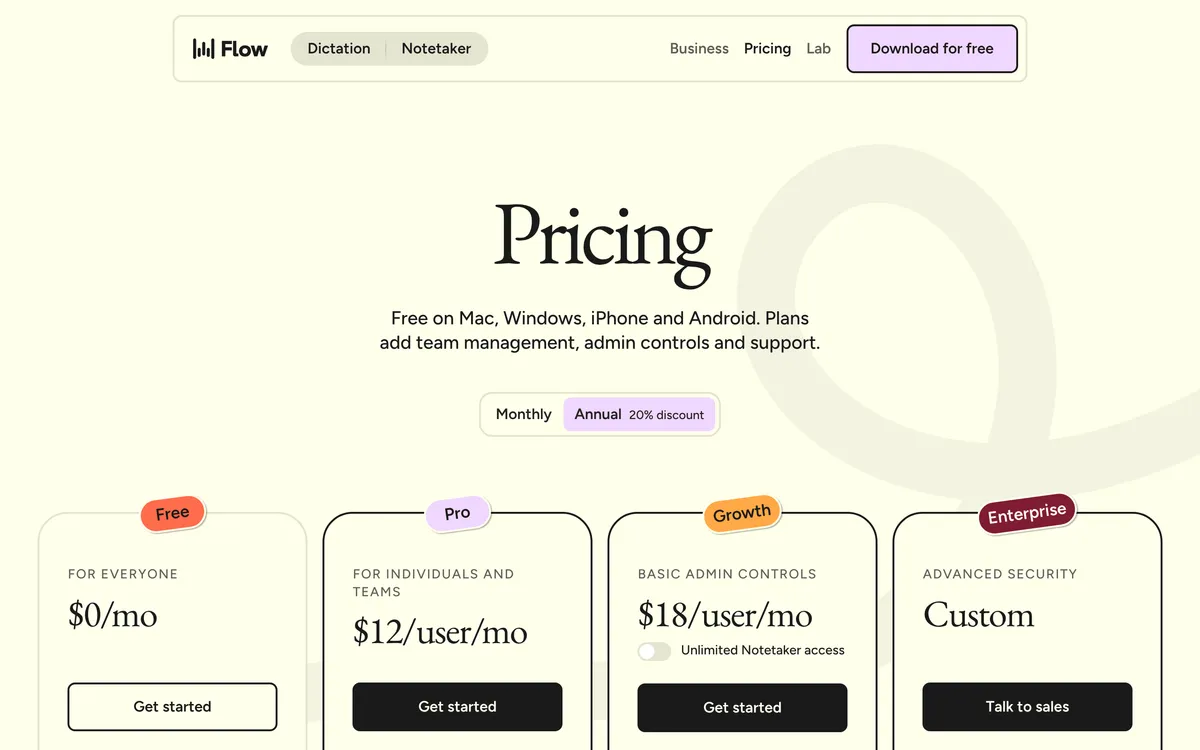 Screenshot of wisprflow.ai, taken October 24, 2026.
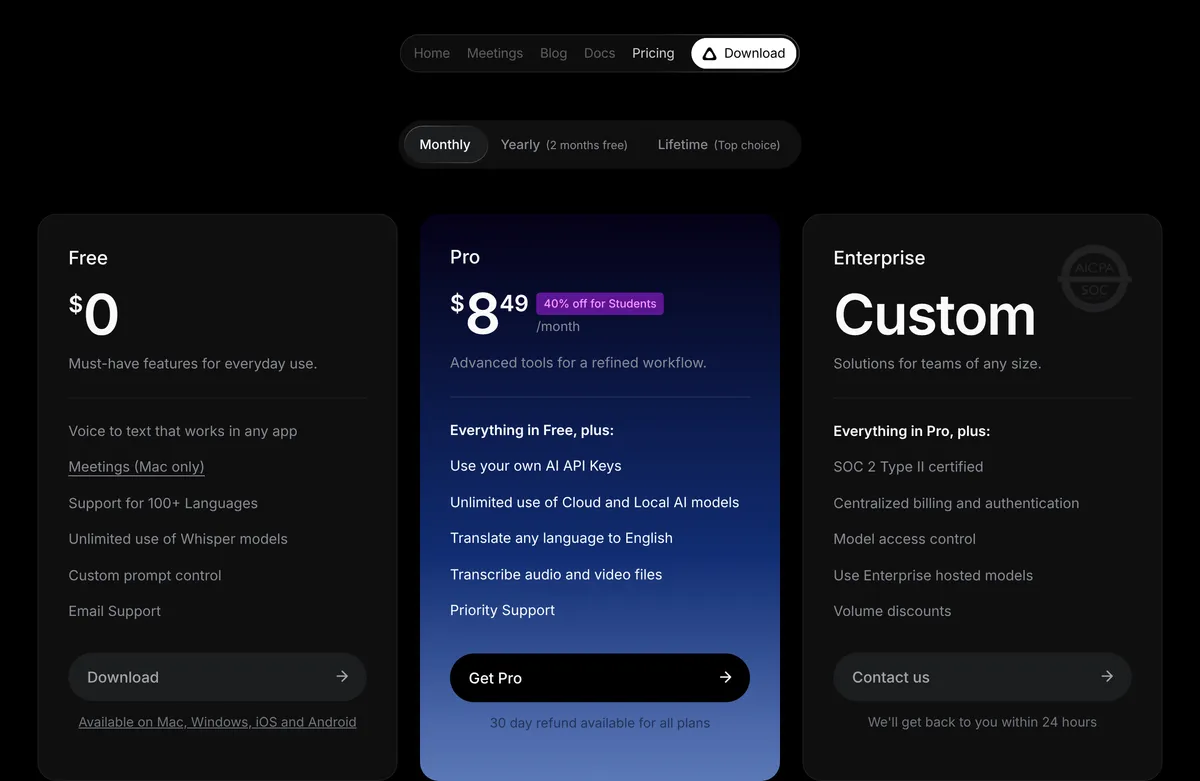 Screenshot of superwhisper.com, taken October 24, 2026.
The free plans differ more than the prices do:
- Wispr Flow Free limits how much you dictate. The pricing page says 2,000 words a week on desktop and "limited weekly use on mobile." Wispr's help center gives the default numbers: on Mac and Windows you get a notice at 2,000 words and dictation stops above 5,000. Phones stop sooner (750 words on iPhone, 1,500 on Android). Counts reset every Sunday.
- Superwhisper Free limits what happens to the text. You get unlimited dictation with local Whisper models, custom vocabulary, text replacements and up to two modes with "no AI processing." Cloud models and the AI modes that strip filler words need Pro. New users get 3,000 words of Pro features to try first.
So the free-plan trade is a weekly word cap with Wispr Flow, or no AI cleanup with Superwhisper.
Does Wispr Flow or Superwhisper work offline?
Only Superwhisper. Wispr Flow's data controls page says "Transcription always occurs on the cloud," so no internet means no dictation.
Superwhisper handles each dictation in two steps: speech to text, then optional AI cleanup. You choose local or cloud for each step. With a local voice model and a local language model, its sensitive data guide says no audio or text leaves your machine.
Local models need decent hardware. Superwhisper's homepage FAQ says offline models "only run really well on Apple Silicon macs," so Intel Macs do better with cloud models. On Windows on ARM, Parakeet is its only local voice model, and AI cleanup has to run in the cloud (Windows guide, sensitive data guide). The plans page lists Parakeet and cloud models as Pro features, so expect to need Pro on an ARM laptop.
In the cloud, both use third-party AI providers under zero data retention agreements (Wispr's data controls, Superwhisper's sensitive data guide). The difference is training on your own data:
- Wispr Flow has an "Improve the model for everyone" setting that lets Wispr use your audio, transcripts and edits to train its models. It's on by default on Free and Pro, per Wispr's healthcare help article; turn it off in Settings → Data & Privacy. A separate Dictation cloud storage setting controls whether Wispr keeps your dictations on its servers.
- Superwhisper says your audio and text aren't used to train any AI models (sensitive data guide).
Both say they're SOC 2 Type II certified (Wispr Flow's pricing page, Superwhisper's comparison page). Both also offer a signed business associate agreement (BAA) for healthcare data. Wispr Flow offers one on every plan, though a BAA turns off its Notetaker, and the Android app has no BAA signing flow (healthcare help article). Superwhisper's sensitive data guide pairs its healthcare setup, which uses cloud models, with a signed Superwhisper BAA or your own API keys. That guide also lists a fully local setup as the option where no data leaves the device.
Which writes cleaner text, Wispr Flow or Superwhisper?
Wispr Flow cleans up text without any setup. Superwhisper gives you more control, through modes you choose.
Wispr Flow cleans up every dictation: its homepage says it removes filler words, adds punctuation and formats your writing, even if you "change your mind mid-sentence." Styles set capitalization and punctuation per type of app (English only). On paid plans, Command Mode edits selected text when you say what to change.
Superwhisper works through modes. Message mode removes filler words and fixes grammar. Super mode reads the app you're in, any selected text and your clipboard to get names and tone right. Custom modes run your own instructions on a model you choose, such as GPT-5 or Claude Haiku 4.5, and Pro lets you bring your own API keys. That's more power than Wispr's styles, and more to set up.
Both keep a custom vocabulary on the free plan. Wispr Flow adds snippets: say a shortcut, and Flow types the saved text, like an address or a bio. Superwhisper's text replacements do a similar job without AI: they fix a misheard word or expand a phrase the same way every time.
On raw accuracy, the only head-to-head numbers we found are Superwhisper's own. Its benchmark page, updated 3 September 2026, gives its S1 Voice cloud model a 6.6% word error rate and Wispr Flow, run with its cleanup switched off, 8.7%. That's one vendor testing a rival, so treat it as a claim and try both with your own voice.
Do both run on Mac, Windows, iPhone and Android?
Yes. Some comparisons still call Superwhisper a Mac app; Wispr Flow's own comparison page lists it as "Mac and iOS app" (checked 24 October 2026). Superwhisper's site lists Mac, Windows, iOS and Android.
- Older Macs: Wispr Flow needs macOS 12 or later; current Superwhisper needs macOS 14. On macOS 12 or 13, Superwhisper's install help points you to an older release that supports your Mac (2.16.1 is the last for macOS 13.3 and later), and older versions get no new features, models or fixes.
- ARM laptops: Wispr's supported devices page says Windows on ARM isn't supported. Superwhisper runs on x64 and ARM64.
- Windows features: Superwhisper on Windows lacks the Mac app's coding agent integrations, command line tool and Meetings (Windows guide).
Does Wispr Flow or Superwhisper work on Linux?
Wispr Flow: no. Its help center says "There is no native Linux application." From Flow on Windows or a Mac, you can dictate into WSL, a Linux VM or an SSH session, but you paste each transcript yourself (Alt + Shift + Z on Windows, Ctrl + Cmd + V on Mac). More in Wispr Flow for Linux.
Superwhisper: yes, for Omarchy first. Superwhisper publishes Linux builds on GitHub. Version 1.0.0 (9 October 2026) was "the first stable release" and brought KDE Plasma and GNOME support; 1.0.1 added ARM builds, and 1.1.1 followed on 23 October. But the files are still named for Omarchy, and the README calls it "prerelease software" that "targets x86-64 systems running Omarchy." Superwhisper's site doesn't list Linux, and its Handy comparison still says "No Linux yet." More in Superwhisper for Linux.
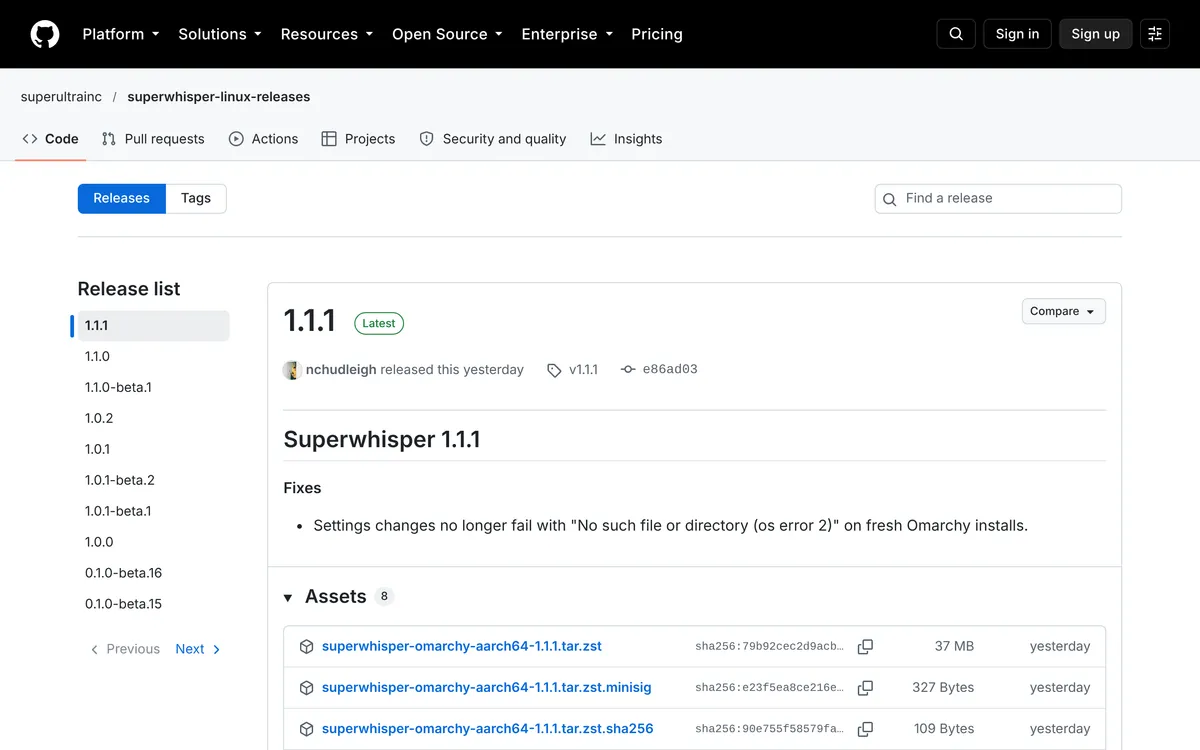 Screenshot of github.com, taken October 24, 2026.
If you run Omarchy and already own Superwhisper, try its Linux build. On Ubuntu, Fedora or Debian, there's a third option.
What to use on Linux: Blip AI
We build Blip AI, so this is our own product. Blip AI ships an AppImage for Ubuntu/Debian, Fedora and Arch that runs on Wayland and X11. Hold Ctrl + Super, speak and let go, and cleaned-up text lands in the window you're using, terminals and SSH sessions included. Blip Cloud is the default; on Pro you can download on-device Whisper models and dictate offline. Blip AI also runs on Mac, Windows, iOS and Android.
Where Blip AI falls short of these two: its free plan is 2,000 words a month, less than Wispr Flow's weekly allowance or Superwhisper's unlimited local tier. Pro costs the same as Wispr Flow ($15 a month or $12 billed yearly) and more than Superwhisper, with a 7-day free trial.
To install it, download the AppImage from the Linux page. On X11, make it executable with chmod +x and run it. On Wayland, a short one-time setup on the same page lets Blip type into other windows. Other platforms are on the download page. For open-source, fully local tools, see the best dictation apps for Linux.
Who should pick Wispr Flow, and who should pick Superwhisper?
Pick Wispr Flow if:
- You want clean text from the first dictation, with no modes or models to choose.
- Your Mac runs macOS 12 or 13.
- Your team wants a shared dictionary and snippets. Even Superwhisper's comparison page says Wispr's team admin controls are more developed.
- You're a student: three months of Pro are free with a .edu email.
Pick Superwhisper if:
- You dictate on flights or locked-down networks, or your audio must stay on your machine.
- You want to write your own AI instructions or choose the model.
- You'd rather pay once ($249.99) or pay less each month ($8.49).
- You use a Windows on ARM laptop, or you run Omarchy.
- You also transcribe audio and video files. Superwhisper Pro does; its comparison page says Wispr Flow doesn't.
Look past both if you're on Ubuntu, Fedora or Debian; see the Linux sections above.
FAQ
Is Superwhisper better than Wispr Flow? For offline use, privacy and price, yes. Superwhisper runs local models, costs $8.49 a month against Wispr Flow's $15, and sells a $249.99 lifetime licence. For clean text without any setup, or on a Mac older than macOS 14, Wispr Flow is the easier pick.
Does Wispr Flow work offline? No. Wispr Flow's data controls page says transcription always happens in the cloud, so it needs an internet connection. Superwhisper works offline with local models.
Is Superwhisper free? Yes. Superwhisper's free plan gives unlimited dictation with local Whisper models, custom vocabulary and up to two modes without AI processing. Cloud models and AI cleanup modes need Superwhisper Pro, from $8.49 a month.
Is Wispr Flow free? Yes, up to 2,000 words a week on Mac and Windows, with lower limits on phones. Wispr Flow Pro removes the cap for $15 a month, or $12 a month billed yearly.
Does Superwhisper work on Windows and Android? Yes. Superwhisper runs on Windows 10 and 11 (x64 and ARM64), iOS and Android, as well as Mac.
Does Wispr Flow work on Windows on ARM? No. Wispr Flow's supported devices page says Windows on ARM isn't supported, and the app quits with "Unsupported Windows Architecture." Superwhisper has an ARM64 Windows build.
Do Wispr Flow or Superwhisper work on Linux? Wispr Flow doesn't; its help center says there's no native Linux app. Superwhisper publishes Linux builds on GitHub, aimed at Omarchy, with KDE Plasma and GNOME support added in October 2026. Blip AI has an AppImage for Ubuntu/Debian, Fedora and Arch.
Compare each one with Blip feature by feature: Blip AI vs Wispr Flow and Blip AI vs Superwhisper. More options: Wispr Flow alternatives.