
Voice Typing for Arthritis: Typing With RA or Sore Hands
Voice typing for arthritis: free dictation on Windows, Mac and phones, keyboard settings that ease sore joints, and when hands-free beats holding a key.
Quick answer: Voice typing helps with arthritis by replacing most key presses with speech. Start free: Windows key + H on Windows, Dictation on a Mac, or your phone keyboard's microphone. Turn on Sticky Keys so shortcuts take one key at a time, use hands-free dictation on bad days so you don't hold a key, and rest your voice.
This guide covers settings and tools, not treatment. If typing hurts, see your doctor, and ask about an occupational therapist: the NHS says one can give you advice that helps "protect your joints", at home and at work. We build Blip AI, a dictation app, so we'll say where the free options are enough.
Does voice typing help with arthritis?
It can, if typing is what makes your hands hurt. Talking replaces the pressing, stretching and gripping that typing asks of your fingers and wrists. It won't replace every key. You'll still use a mouse, and you'll still fix the odd word by hand.
Arthritis is common. About 53.2 million US adults (21.2%) reported diagnosed arthritis in 2019 to 2021, according to a CDC report. The UK charity NRAS says many people with rheumatoid arthritis find using a computer for a long time painful, and that a standard keyboard and mouse can be hard to use, "especially during a flare". It names voice command software as one way to cut down on typing. In the US, the Job Accommodation Network lists voice to text and speech recognition software among its work accommodations for arthritis (checked October 2026).
Why typing hurts with rheumatoid arthritis and osteoarthritis
Typing works the same small joints that arthritis tends to hit. Rheumatoid arthritis and osteoarthritis affect the hands in different ways:
| Rheumatoid arthritis (RA) | Osteoarthritis (OA) | |
|---|---|---|
| What it is | An autoimmune disease: the immune system attacks the lining of the joints (NHS) | The exact cause isn't known. Age, injury, family history and a job that strains the joints raise the risk (NHS) |
| Hand joints | Wrist and finger joints, usually on both sides (Arthritis Foundation) | Wrists, the base of the thumb, the middle finger joints and the joints nearest the nails (same source) |
| Morning stiffness | Often lasts more than 30 minutes (Arthritis Foundation) | Usually eases within 30 minutes of moving (same source) |
| Day to day | Can vary a lot: you might "feel pretty well one day" and not the next (same source). The NHS calls the bad spells flares | Stiffness after rest, which eases as you move |
The way you type can change too. In a small University of Pittsburgh study of 33 touch typists with RA, presented in 2010, those with structural hand deformities more often pressed keys with whole-hand motions instead of moving individual fingers, and fewer used a wrist support (news release). The researchers suggested an ergonomic keyboard, a movable wrist support or a redesigned desk setup, and pointed to occupational therapists as the experts in safer ways to work.
So plan for good days and bad days. A setup that only works when your hands feel fine won't last.
Keyboard settings and hardware that ease typing with arthritis
Before you change how you write, change how the keyboard responds. Windows, Mac and Linux all have free settings for this:
- Sticky Keys lets you press shortcuts one key at a time. Instead of stretching for Ctrl + S, you press Ctrl, let go, then press S. Microsoft suggests it "if you have trouble pressing two keys at the same time".
- Filter Keys (Windows) makes the keyboard ignore brief or repeated presses.
- Slow Keys (Mac and Linux) only accepts a key once you've held it for a short delay, so a brush against the wrong key doesn't type. Bounce Keys (Linux) ignores fast repeats of the same key.
| Windows 11 | Mac | Linux (GNOME) | |
|---|---|---|---|
| Where to find it | Settings > Accessibility > Keyboard, or press Windows key + U | System Settings > Accessibility > Keyboard | Accessibility settings > Typing > Typing Assist |
| Sticky Keys shortcut | Press Shift five times | Press Shift five times, if that option is on in Sticky Keys settings | Press Shift five times (turn on Enable by Keyboard first) |
| Ignore stray presses | Filter Keys: hold right Shift for eight seconds to toggle | Slow Keys | Slow Keys and Bounce Keys |
| Quick on and off | Windows key + U opens the settings | Option + Command + F5 opens Accessibility Shortcuts | The accessibility icon in the top bar, which appears once a setting is on |
Sources, all checked October 2026: Microsoft's keyboard settings guide and accessibility shortcuts, Apple's Mac keyboard accessibility guide, and GNOME Help on Sticky Keys, Slow Keys and Bounce Keys. Other Linux desktops put these settings in different places.
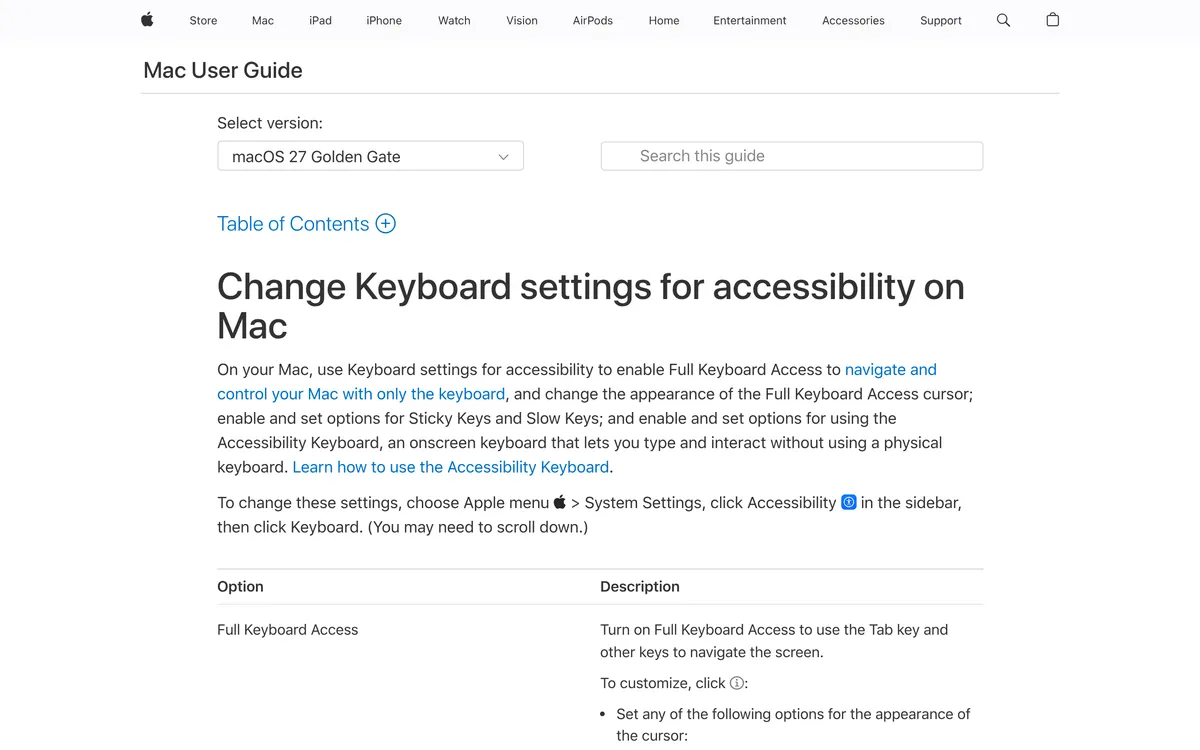 Screenshot of support.apple.com, taken October 24, 2026.
Set up the desk while you're at it. Keep your elbows at a right angle and your wrists relaxed while you type, as the Arthritis Foundation advises. A wrist rest can help, but don't lean on it hard: the same page warns that resting your wrist on it too much can press on the carpal tunnel.
For hardware, NRAS names ergonomic keyboards and wrist supports. For the mouse, try a vertical one. The Arthritis Foundation's office ergonomics guide says: "Vertical mice, for example, orient and support your hand in an upright, neutral position."
On a phone, the same idea applies. Occupational therapist Julie Dorsey, speaking to CreakyJoints, recommends swipe typing because "it takes away some of that repetition on your thumbs". The same article suggests predictive text, turning the phone sideways for bigger keys, and voice dictation.
Free voice typing on Windows, Mac, iPhone and Android
Windows, Mac, iPhone and Android all have free voice typing built in. On Linux you install an app. None of the built-in tools need you to hold a key while you talk: you press or tap once, and they listen.
| Option | How to start | Worth knowing |
|---|---|---|
| Windows voice typing | Click into a text box and press Windows key + H | Needs an internet connection. Say "stop listening" to end. Turn on automatic punctuation in its settings |
| Windows Voice Access | Settings > Accessibility > Speech | Works without internet. Controls the whole PC by voice. Windows 11, version 22H2 and later |
| Mac Dictation | Turn on in System Settings > Keyboard > Dictation, then press the Microphone key or your Dictation shortcut | Stops after 30 seconds without speech |
| Mac Voice Control | System Settings > Accessibility > Voice Control | Dictate text and control apps by voice. Standard Dictation is off while it's on |
| iPhone and iPad | Tap the microphone on the keyboard. If it's missing, turn on Settings > General > Keyboard > Enable Dictation | Stops after 30 seconds of silence |
| Android | Tap the microphone at the top of the Google keyboard (Gboard) | Not every language is supported |
| Linux | Install a dictation app | See how to voice type on Linux and the best dictation apps for Linux |
Features checked on Microsoft's, Apple's and Google's support pages in October 2026. For more on the two Windows options, see voice to text on Windows.
To see whether talking suits you before you change any settings, try our free speech to text tool in Chrome, Edge or Safari. It runs on your browser's speech recognition.
If you need to move the mouse and open windows by voice as well as write, Voice Access or Voice Control is the better fit. Dictation apps, Blip included, focus on writing.
Hold-to-talk or hands-free: which is easier on sore hands?
There are two ways to start and stop dictation.
Hold-to-talk (push-to-talk) dictation records only while you hold a key down. Hands-free (toggle) dictation starts with one press and keeps listening, so nothing stays pressed while you talk.
- Hold-to-talk is good for short replies. Press, say a sentence, let go, and the text appears. It only records while you press, and there's nothing to switch off afterwards.
- Hands-free is good for bad days and long writing. If pressing a key is what hurts, holding one down for a 30-second paragraph is the wrong habit. A toggle asks for one press instead.
With RA in particular, symptoms can change from day to day, so it helps to have both on the same keys and switch without thinking. Whichever you use, put the hotkey where your least painful hand can reach it, and change it if a flare moves to that hand.
How to pace yourself and rest your voice
Switching to voice moves some of the work from your hands to your voice. A few habits keep both comfortable:
- Dictate drafts, edit once. Say the whole message, then fix it in one pass at the end. Stopping after every sentence to correct a word brings the keys back.
- Mix voice and keyboard. You don't have to go all voice. Dictate the writing and keep the keyboard for short edits, especially on good days.
- Take breaks before the pain starts. The Arthritis Foundation suggests standing up every 30 minutes or so, or a 2 to 5 minute walk every hour, to rest your fingers after typing. Julie Dorsey suggests that for every page you type, you open and close your hands into gentle fists five times (CreakyJoints).
- Look after your voice. The NIDCD advises drinking plenty of water, taking "vocal naps" through the day, and not talking over noise. We'd suggest building up over a week or two rather than switching overnight.
RA can also affect the voice. In an Arthritis Foundation Q&A, rheumatologist Simon Helfgott, MD, says hoarseness in RA may come from inflamed cricoarytenoid joints, which sit next to the vocal cords. He calls that cause "quite uncommon nowadays", mostly in people who've had RA for a long time. If you get hoarse and it doesn't pass, raise it with your rheumatologist and an ear, nose and throat (ENT) doctor, as he advises, before you lean harder on dictation.
Voice typing for arthritis with Blip AI
The built-in tools are a good place to start. If they leave you with too much to fix by hand, a dictation app can take more off your hands. Here's what Blip AI adds:
- Hold or hands-free, on the same keys. Hold Fn on Mac, Ctrl + Win on Windows or Ctrl + Super on Linux, speak, and let go. Add Space to the same keys (Fn + Space on Mac) for hands-free mode, so you don't have to keep holding anything. You can change both shortcuts to keys that suit your hands.
- Less to fix by hand. Blip removes filler words and fixes punctuation and formatting as it types.
- Your words, spelled right. Add names, medication names and work jargon to Blip's dictionary.
- Replies without typing. Start with "Hey Blip" and describe the reply you want. Action Mode drafts the email or Slack message.
- Everywhere you write. Any app with a text field on Mac, Windows and Linux, plus iOS and Android apps.
The free plan includes 2,000 words a month. If arthritis makes typing hard, Blip gives 50% off the first year of Pro to people with arthritis, chronic pain or a disability, and to seniors. No proof is needed. The offer ends December 31, 2026. Download Blip AI to try it. For more, see our guides to dictation for RSI and carpal tunnel and voice typing for seniors.
FAQ
Does voice typing help with arthritis? It can, if typing is what makes your hands hurt. Voice typing replaces most key presses with speech, which takes load off sore finger and wrist joints. It isn't a treatment, so use it alongside your doctor's or occupational therapist's advice.
Can typing cause arthritis? Typing isn't a known cause of rheumatoid arthritis. The NHS says RA is caused by the immune system attacking healthy tissue, and lists genes, hormones and smoking as risk factors. For osteoarthritis the exact cause isn't known, though the NHS lists a job that puts frequent strain on your joints as one risk factor. Either way, many people with RA find long computer sessions painful, according to NRAS.
What keyboard settings help with arthritis? Sticky Keys, so you press shortcuts one key at a time, and Filter Keys on Windows or Slow Keys on Mac and Linux, so stray or repeated presses don't type. On Windows 11 they're in Settings > Accessibility > Keyboard. On a Mac they're in System Settings > Accessibility > Keyboard.
Does Windows voice typing work offline? No. Windows voice typing (Windows key + H) needs an internet connection. Voice Access, built into Windows 11 version 22H2 and later, works without one and also lets you control the PC by voice.
Is hands-free or hold-to-talk dictation better for arthritis? Hands-free is easier when pressing a key hurts, because you press once instead of holding a key while you speak. Hold-to-talk is quick for short replies on good days. A dictation app that offers both on the same keys lets you switch as your hands change.
Can I get dictation software as a work accommodation for arthritis? It's worth asking. In the US, the Job Accommodation Network lists voice to text and speech recognition software among its accommodations for arthritis, and gives free, confidential advice on job accommodations.
Is there a discount on dictation software for arthritis? Blip AI gives 50% off the first year of Pro to people with arthritis, chronic pain or a disability, and to seniors, until December 31, 2026. No proof is needed.