
One-Handed Typing: Layouts, Keyboards and Voice Compared
One-handed typing options side by side: free one-handed layouts, Half-QWERTY, one-handed keyboards, Sticky Keys and voice typing, and which to pick when.
Quick answer: For one-handed typing, start free: turn on Sticky Keys so shortcuts take one key at a time, and use voice typing (Windows key + H, Mac Dictation) for longer text. Typing one-handed for good? Learn one-handed Dvorak. For dictation that cleans up your words, our pick is Blip AI (we make it).
This guide covers settings and tools, not treatment. If you're recovering from a stroke, an injury or surgery, an occupational therapist can match these options to your hand.
What are the options for typing with one hand?
There are four, and most people end up combining two of them:
| Option | Cost | Learning time | Best for |
|---|---|---|---|
| Sticky Keys | Free, built in | Minutes | Shortcuts like Ctrl + S, from day one |
| One-handed layout (one-handed Dvorak) | Free, built in | About as long as learning to touch type | Typing one-handed for good |
| One-handed keyboard (Half-QWERTY, chorded) | About $229 to €1,080 | Hours of practice or more | Touch typists, or a free hand for the mouse |
| Voice typing | Free built-ins; apps from free | Minutes | Long text: emails, documents, messages |
The Shirley Ryan AbilityLab, a rehabilitation hospital in Chicago, lists the same kinds of options in its guide to computer access for one-handed typing: Sticky Keys, abbreviation expansion to "reduce the number of keystrokes required", one-handed Dvorak, training programs and speech recognition. On speech, it says it "has the potential to be up to 3x faster than typing".
Turn on Sticky Keys first
Sticky Keys lets you press a shortcut one key at a time: Ctrl, let go, then S. It's the one setting every one-handed typist needs, whatever else you choose.
| Windows | Mac | Linux (GNOME) | |
|---|---|---|---|
| Where | Windows key + U > Keyboard > Sticky keys | System Settings > Accessibility > Keyboard | Accessibility > Typing > Typing Assist |
| Shortcut | Press Shift five times | Press Shift five times, if that option is on | Press Shift five times, with Enable by Keyboard on |
Sources, checked November 27, 2026: Microsoft, Apple and GNOME Help.
One-handed keyboard layouts you already have
A one-handed layout moves the most-used letters under one hand. One-handed Dvorak comes in a left-hand and a right-hand version, and all three desktop systems include it:
- Windows: "United States-Dvorak for left hand" and "for right hand" (Microsoft's layout list).
- Mac: "Dvorak - Left-Handed" and "Dvorak - Right-Handed". Add them in System Settings > Keyboard > Text Input > Edit, then search for Dvorak (Apple).
- Linux: "English (Dvorak, one-handed, left)" and "right" in xkeyboard-config.
It's free, but you'll learn to type again, and your key labels won't match. If you'd rather keep QWERTY, Five Finger Typist teaches one-handed touch typing on a normal keyboard in 21 lessons.
One-handed keyboards: Half-QWERTY and chorded
Half-QWERTY keeps the QWERTY you know. You type the half under your hand as usual; hold the space bar and the same keys type their mirror image from the other half. In the 1996 study by its inventor Edgar Matias and colleagues, touch typists passed hunt-and-peck speed after 3 to 4 hours of practice and, after 10 hours, typed 23.8 to 42.8 words per minute, 41% to 73% of their two-handed speed.
Matias sells the Half Keyboard and the Half-QWERTY Pro Keyboard for $595 each, both in stock in its store on November 27, 2026 (more on matias.ca).
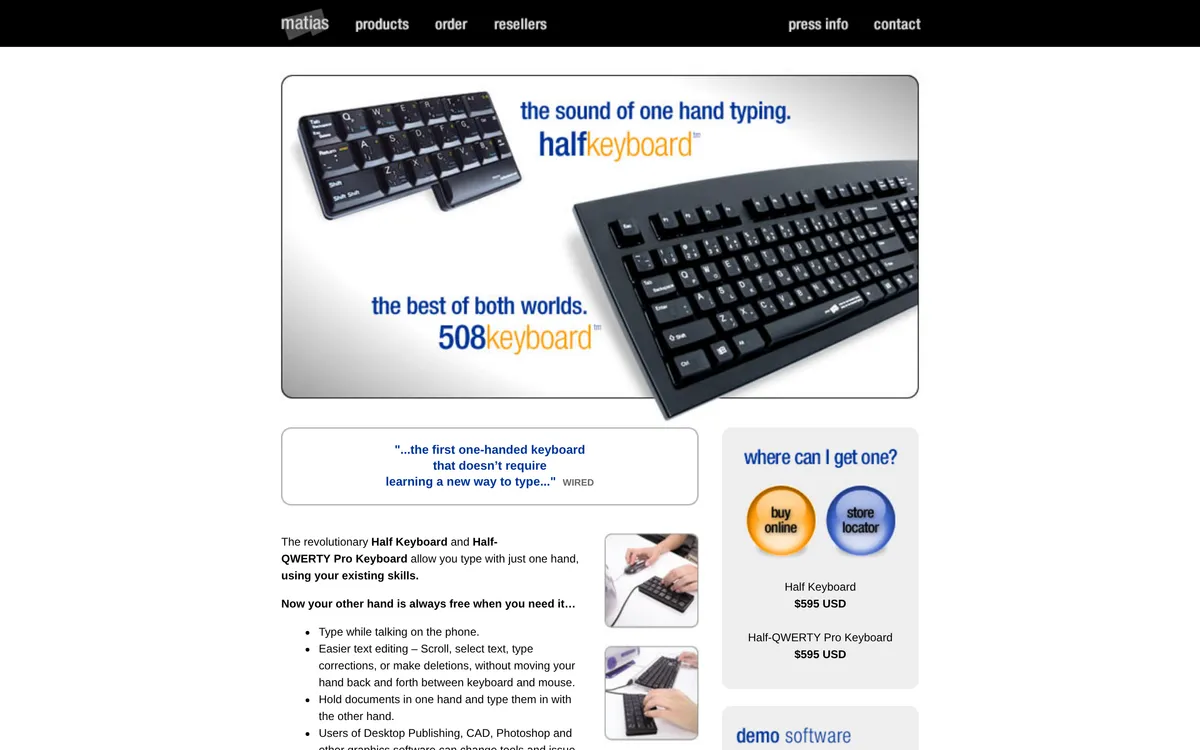 Screenshot of matias.ca, taken November 27, 2026.
Other one-handed keyboards, prices from their own stores on November 27, 2026:
- Twiddler 4: a handheld chorded keyboard and mouse, from $229, in stock.
- TiPY: a one-handed keyboard for either hand, €1,080.
- Maltron Single Hand: £335 for the Danish-layout model, but marked "Unavailable".
On a chorded keyboard such as the Twiddler, each letter is a combination of keys pressed together.
Voice typing: write whole sentences with one hand
Voice takes the most work off your hand: you speak whole sentences instead of finding each key. Every system has a free option:
- Windows: press Windows key + H to start voice typing. To control the whole PC by voice, use Voice Access (Windows 11, version 22H2 and later).
- Mac: turn on Dictation in System Settings > Keyboard, then press the Microphone key or your Dictation shortcut. Voice Control adds commands for apps and the screen.
- Linux: there's no system-wide voice typing by default. See how to voice type on Linux.
If you need to move the mouse and open windows by voice, Voice Access or Voice Control is the better fit. Dictation apps, Blip included, focus on writing.
One-handed voice typing with Blip AI
The built-ins are a good start. If they leave too much to fix by hand, which is slow with one hand, Blip AI is our pick:
- One hand on one or two keys. Hold Fn on Mac, or Ctrl + Win on Windows and Linux (next to each other on most keyboards), speak, and let go. Add Space to the same keys for hands-free mode, so nothing stays held while you talk. You can move both shortcuts to keys your hand reaches.
- Less to fix. Blip removes filler words and fixes punctuation and formatting as it types.
- Replies without typing. Start with "Hey Blip" and describe the reply you want; Action Mode drafts the email or message.
- Any app with a text field, on Mac, Windows, Linux, iPhone and Android.
The free plan includes 2,000 words a month. Blip gives 50% off the first year of Pro to people with a disability or a condition that makes typing hard, until December 31, 2026, with no proof needed. Download Blip AI, or read our guides to dictation for RSI and carpal tunnel and voice typing for arthritis.
Which one-handed typing option should you pick?
- A few weeks in a cast or sling: Sticky Keys plus voice typing. Learning a new layout isn't worth it.
- One hand for good: Sticky Keys, voice for long writing, and a one-handed layout or Half-QWERTY for short edits, passwords and code. For the voice part, we'd pick Blip AI: one hand holds one or two keys, and the text arrives cleaned up, so there's less to correct key by key.
- You want a hand free for the mouse: a one-handed keyboard, or voice.
FAQ
Can you learn to touch type with one hand? Yes. AbilityNet says "it is possible to learn to touch type using one hand" and names typing tutors such as Five Finger Typist. One-handed Dvorak is the other route.
How fast can you type with one hand? In the 1996 Half-QWERTY study, touch typists reached 23.8 to 42.8 words per minute after 10 hours, and in extended testing averaged as high as 60 words per minute.
Is there a free one-handed keyboard layout? Yes. Windows, Mac and Linux all include one-handed Dvorak for the left or right hand.
What's the easiest way to type with one hand after a stroke? Turn on Sticky Keys and use voice typing; neither needs a new skill. Ask your occupational therapist before buying hardware.
Is voice typing faster than typing with one hand? It can be. The Shirley Ryan AbilityLab says speech recognition "has the potential to be up to 3x faster than typing". More in is voice typing faster than typing?
How do I type with one hand on an iPhone? Press and hold the Emoji or keyboard-switch key and pick the left- or right-handed layout, which moves the keys closer to your thumb (Apple). The keyboard's microphone lets you dictate instead.